Introduction
A part with features on four sides shouldn't need four separate setups. Yet on a standard 3-axis mill, that's exactly what happens: unclamp, flip, re-align, re-cut. Each re-clamp adds lead time, labor, and a fresh chance for alignment error to creep into your tolerances.
4-axis CNC milling solves this by adding a rotary axis that turns the workpiece while it stays locked in one fixture. This guide covers how the technology works, how it compares to 3-axis and 5-axis machining, its real-world benefits, design considerations, common applications, and how to choose a machining partner.
Multi-axis adoption is accelerating across manufacturing. Technavio projected the 5-axis CNC machining-center market alone would add $627.30 million in growth at a 5.75% CAGR between 2021 and 2025. That same push toward rotary-axis capability is showing up in 4-axis work across medical, automotive, and industrial shops.
Key Takeaways
- Cut multiple faces or cylindrical features in one fixture with a rotary A-axis—fewer setups, less clamping error
- Use indexed (3+1) for most multi-face parts; reserve continuous 4-axis for helical grooves and cam profiles
- 4-axis costs less than 5-axis to buy and operate, yet still covers angled and rotational geometry
- Design reviews should flag blocked geometry and angular clocking early to avoid fixture collisions
- Outsourcing multi-axis work avoids capital investment and gains access to certified quality systems
What Is a 4-Axis CNC Milling Machine?
Standard CNC milling moves a cutting tool along three linear axes: X (left-right), Y (front-back), and Z (up-down). 4-axis milling adds a rotary axis, typically labeled A and rotating around the X-axis. This lets the workpiece itself rotate without ever leaving the fixture.
Mechanically, that rotation comes from one of two setups:
- Rotary table: A T-slotted platform that accepts flexible fixturing, well-suited to round parts and odd-shaped castings
- Trunnion or indexer: Often built around a collet chuck, ideal for cylindrical stock held on-center
The spindle still moves in X, Y, and Z exactly as it would on a 3-axis machine. The difference is that the part itself can turn to present a new face to the tool, so a single setup can reach geometry that would otherwise demand a full re-fixture.
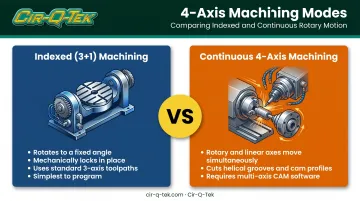
Those setups support two operating modes: indexed (3+1) and continuous 4-axis.
Indexed (3+1) Machining
This is the workhorse mode for most 4-axis jobs. The rotary axis turns the part to a fixed angle, locks (often with a mechanical brake), and the machine cuts using standard 3-axis toolpaths. Once that face is finished, the axis unlocks, rotates, and locks again at the next position.
It's the simplest 4-axis mode to program because each indexed position is essentially a separate 3-axis operation. There's no simultaneous motion to coordinate, which is why it's the default choice for most multi-face parts.
Continuous 4-Axis Machining
Continuous, or simultaneous, machining rotates the part while the spindle is actively cutting, coordinating rotary and linear motion at the same time. This is how shops cut helical grooves, cam profiles, and wrap-around engraving that indexed machining can't produce in one continuous pass.
The control ties rotation directly to cutting motion through the A-axis coordinate. A command like A90 tells the machine to rotate the part 90 degrees as part of the toolpath itself, not as a separate manual step. This isn't a manual rotary table you crank by hand between passes.
Most continuous toolpaths, especially helical and cam geometry, are generated in CAM software built for coordinated multi-axis motion. Simple cylindrical engraving is sometimes the exception, since some controls support hand-coded commands for that specific task. Anything beyond basic engraving typically needs dedicated multi-axis CAM.
3-Axis vs. 4-Axis vs. 5-Axis CNC Milling: Key Differences
Choosing the right machine class comes down to how your part's geometry relates to the cutting tool. Here's how the three approaches compare:
| Factor | 3-Axis | 4-Axis | 5-Axis |
|---|---|---|---|
| Axes of motion | X, Y, Z | X, Y, Z + one rotary (A) | X, Y, Z + two rotary (commonly A+C or B+C) |
| Setups for multi-face parts | New setup per face | One setup for features around the rotary axis | One setup for nearly any face, including compound angles |
| Angled/compound-angle access | None | Angled features along the rotary axis only | Full compound-angle and undercut access |
| Programming complexity | Baseline | Moderate; indexed mode reuses 3-axis strategies | Highest; simultaneous coding is a bigger lift than 3- or 4-axis work |
| Relative machine cost | Lowest | Mid-range | Highest |
| Best-fit part types | Simple prismatic parts, single-face features | Cylindrical parts, multi-face prismatic parts, helical/cam geometry | Compound-angle geometry, undercuts, complex free-form surfaces |
3-axis keeps the workpiece bolted down and moves only the tool. It handles simple, flat, or single-face geometry well, but features on additional faces require unclamping, re-aligning, and re-cutting. It cannot reach angled or compound-angle features at all.
4-axis adds rotation about one axis, so features around a cylinder or across several faces of a prismatic part can be machined in a single setup. It handles angled features and helical or cam geometry within that rotary range. It cannot reach true compound angles: features that need two independent rotation angles at once.
5-axis adds a second independent rotary axis, giving the tool access to nearly any face or angle without repositioning. That flexibility costs more: 5-axis machines carry a higher price tag, and simultaneous programming is a bigger step up than indexed 3+1 or continuous 4-axis work.
Quick selection guide:
- Simple prismatic parts with features on one or two accessible faces: 3-axis
- Cylindrical or multi-face parts without compound angles: 4-axis
- Compound-angle geometry, undercuts, or complex 3D surfacing: 5-axis
Benefits of 4-Axis CNC Milling
Fewer Setups, Less Labor
Every re-clamp costs time: an operator has to unload, re-align, and re-zero the part before cutting resumes. Consolidating that into one fixture removes those steps entirely.
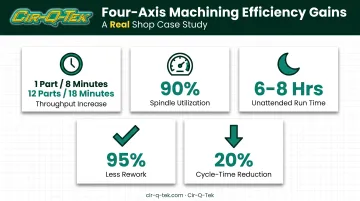
The efficiency gains show up fast. Modern Machine Shop documented a case at McKenzie CNC where switching an antenna job to horizontal four-axis machining took the process from one part every 8 minutes to 12 parts in 18 minutes, more than doubling throughput. The shop also reported:
- Spindle utilization near 90%, with room to push toward 95%
- Unattended run times of six to eight hours on tombstone-loaded jobs
- 95% less rework tied to part and fixture changes
- 20% cycle-time cut on an engraving operation
Tighter Inter-Feature Tolerances
When every face of a part is machined from one datum reference, tolerances between features stay locked to that single point of origin.
Re-clamping introduces small alignment shifts each time a part is unloaded and reloaded. Those shifts stack up fast on parts with tight positional or angular requirements.
Better Cost Efficiency Than 5-Axis for Rotational Work
Not every part needs full compound-angle access. If your geometry only requires rotation around one plane—a shaft with cross-holes, or a housing with features on four sides—a 4-axis machine is enough.
You avoid the extra machine cost and programming complexity of a 5-axis setup. Simpler programming also means less engineering time per job, which keeps quoted costs lower when true 5-axis capability is not required.
Design & Workholding Considerations for 4-Axis Parts
Getting the most out of 4-axis machining starts at the design stage.
Rotary axis accessibility comes first. Every feature needs to be reachable by the tool at some rotation angle. Flag inward-facing pockets, deep undercuts, or geometry blocked by adjacent features during design review. A 4-axis machine can't reach around a corner the rotary axis never exposes.
Workholding depends on part shape and how many faces need spindle access:
- Collets, chucks, and centers for cylindrical parts held on-center
- Tombstones or trunnions for prismatic parts that need several faces exposed
- Custom fixtures when stock geometry won't seat cleanly on standard workholding
At every rotational position, the fixture and part need clearance from the spindle, tool holder, and machine housing. A collision that only shows up at one specific angle is easy to miss without a proper setup check.
Angular relationships belong on the drawing. Keyways, bolt patterns, and ports that sit at a set angle to another feature must be clocked to the fixture datum. Without a clear callout, the machinist has no way to hold the intended angular tolerance between features.
Common Applications & Industries Using 4-Axis Milling
4-axis machining is built for rotationally symmetric and multi-face geometry that would otherwise require manual workarounds on a 3-axis mill.
Rotary features cut directly, without workarounds:
- Side holes and cutouts on cylindrical stock
- Cross-holes and bolt patterns at specific clock angles
- Helical and arc geometry, including wrap-around cylindrical engraving
- Gas ports and flange features on cylindrical hardware, such as waveguide flanges and RF-load components
Multi-face precision parts benefit just as much. Housings, manifolds, valve bodies, and enclosures with ports or bosses on several sides can be machined from one datum instead of being re-clamped face by face.
Industry use clusters where multi-face accuracy and single-setup traceability matter most:
- Medical devices, where dimensional consistency across features carries direct regulatory weight
- Automotive, where multi-face housings and brackets need repeatable tolerances at volume
- Aerospace, where cylindrical and rotationally symmetric hardware is common
- Industrial process control, where valve bodies and manifolds need precise port alignment
That mix lines up with Cir-Q-Tek's certification structure: ISO 13485 for medical device work and IATF 16949 for automotive, both on top of a baseline ISO 9001 quality system.
Choosing the Right 4-Axis CNC Machining Partner
Buying a 4-axis machine outright means capital equipment, tooling, CAM software licenses, and the training to run it well. If you don't need that capacity around the clock, outsourcing delivers the same rotary-axis capability without the upfront spend. You also gain CAM programming expertise and certified quality systems that can take years to build in-house.
Cir-Q-Tek offers precision CNC machining as one piece of a broader manufacturing platform, alongside PCB and PCBA production. Machining runs on multi-axis, multi-tasking equipment with live tooling and multiple spindles, holding tolerances as close as ±0.0005"—tight enough for the multi-face parts in this guide.
Capabilities that matter for 4-axis work:
- CAD/CAM in-house — design support through production toolpaths under one team
- ISO 9001, ISO 13485, and IATF 16949 — quality, medical, and automotive requirements covered together
- Broad materials — metals, engineered plastics, ceramics, composites, plus finish work on common castings
- No MOQ — prototypes and production runs get the same attention
The dual U.S./China structure is the operating model. Machining runs through ISO-certified facilities tied to Cir-Q-Tek's Shenzhen office. Project management, technical communication, and a secondary quality inspection happen at the Pennsylvania headquarters before parts ship. Offshore manufacturing cost with domestic oversight is what "domestic service, offshore prices" means in practice.
When you need rotary-axis access without full 5-axis complexity—or without buying a machine you only run part-time—that model keeps setup consolidation and tight tolerances without locking up capital. Request a quote with your CAD data to see how a 4-axis approach could simplify your part's setup.
Frequently Asked Questions
How much does a 4-axis CNC machine cost to run?
4-axis machines cost more to operate than 3-axis equipment but less than 5-axis. For multi-face parts, total part cost is often lower on 4-axis, since setup reduction offsets the higher machine rate. Partnering with a precision CNC machining supplier avoids the equipment purchase entirely.
Is there such a thing as a 4-axis CNC machine?
Yes. It's a standard configuration that adds a rotary A-axis to the X, Y, Z linear axes found on any CNC mill. It's common equipment in shops handling cylindrical or multi-face parts.
What CNC machines have 5-axis milling?
5-axis machines add two rotary axes, commonly A+C or B+C, built as trunnion tables or swivel-head configurations. A multi-axis machining partner can give you access to 5-axis work without buying the machine yourself.
What's the difference between 3-axis and 4-axis CNC machining?
3-axis keeps the workpiece fixed, so each face needs a new setup. 4-axis rotates the workpiece on a rotary axis, letting the machine reach multiple faces or cylindrical features in one setup.
What parts are best suited for 4-axis milling?
Cylindrical parts with angular features, multi-sided prismatic parts, and parts with helical or cam geometry—anything that would otherwise need three or more separate 3-axis setups.
Can a 4-axis CNC machine perform continuous machining?
Yes. Continuous mode coordinates rotary and linear motion at the same time, which is how helical grooves and cam profiles get cut. It requires CAM software built for multi-axis toolpaths rather than manual programming.